If you have searched for jojoy Minecraft, you are probably wondering about something. Is this app a clever shortcut to free Minecraft, or something you should avoid? Plenty of websites promise that Jojoy gives you the full game, every skin, and unlimited resources without spending a cent. Imagine a parent who just paid seven dollars for Minecraft on the Play Store. Then they learn their kid’s friend got the same game for free through an app called Jojoy. That gap between price and promise is exactly why this search term keeps trending. This guide explains what Jojoy Minecraft actually is. It also covers the real risks involved and the safer ways to enjoy the game instead.
What Is Jojoy Minecraft?
Jojoy Minecraft is not an official Mojang or Microsoft product. It refers to a modded version of Minecraft. The version is distributed through Jojoy, an unofficial APK app store. Jojoy repackages paid Android games and offers them for free download.
Understanding The Jojoy App Platform
Jojoy positions itself as an alternative to the Google Play Store. It hosts an unofficial APK installer for hundreds of paid apps and games. Instead of buying Minecraft through Google, users download a modified APK file directly from Jojoy’s website. This sidesteps the normal purchase process entirely.
Why Minecraft Players Search For It?
Most people typing jojoy minecraft into Google have one goal. They want the mobile sandbox game without paying the Play Store price. Curiosity about extra mods and unlocked content adds to the appeal. This is especially true among younger players who heard about it from a friend.
What Jojoy Claims To Offer?
Sites promoting Jojoy describe unlocked skins, unlimited resources, and a smoother experience than the official app. These are marketing claims made by the same unofficial sources distributing the file. They are not verified facts from Mojang or any independent testing lab.
How It Differs From Official Minecraft
The official Minecraft app is built, signed, and updated directly by Mojang. It is distributed only through the Google Play Store, Apple App Store, and Amazon. A Jojoy version is repackaged by a third-party app store. That means the code inside has been altered by someone other than the original developer. That single difference is the root cause of nearly every issue covered later in this guide. It explains everything from broken updates to multiplayer servers that refuse a connection.
Why Is Jojoy Minecraft So Popular?
Jojoy’s popularity comes down to one simple thing: the price tag. Minecraft costs around seven dollars on most Android devices. That price alone is enough to stop plenty of curious kids and budget-conscious players from buying it outright.
The promise of mod support adds another layer of appeal. Players assume an unofficial APK installer might unlock content that the official store version does not offer. Combine that with an installation process marketed as quick and simple. The result is a search term that spikes every time a new Minecraft update drops. Android users specifically search for this far more than iPhone owners. Android allows installing apps from unknown sources in the first place. Apple does not generally permit that on its own devices.
Social media plays a role, too. Short clips showing a quick install and a game launching successfully spread fast. Viewers rarely see the follow-up video. In that video, the same app often crashes a week later or fails to connect to a friend’s server. That survivorship bias happens when only the success stories get filmed and shared. It is part of why Jojoy keeps trending even as complaints pile up in app review sections.
What Features Does Jojoy Minecraft Promise?
Skins And Cosmetic Claims
Listings promise an unlocked skins library and extra cosmetic items beyond what the official skins page offers. There is no independent way to confirm these actually work as advertised once installed.
Multiplayer Gameplay Claims
Pages claim full multiplayer gameplay support. The app runs outside Mojang’s authentication system, though. That means joining verified online servers, the way an official account would rarely work as smoothly as advertised.
Survival And Creative Mode Claims
Both survival mode and creative mode are listed as included. That makes sense, since these are core Minecraft modes already built into the base game code that gets repackaged.
Custom Maps And Add-ons
Custom maps and texture packs are advertised as bonus content. That is similar to what players already get for free through Minecraft’s official Marketplace and trusted community sites.
Performance Claims Versus Reality
Several Jojoy pages claim better performance and HD graphics on older phones. That claim is difficult to verify. It is also inconsistent with how an unmodified game engine actually runs on the same hardware.
Is Jojoy Minecraft Safe To Use?
not in the way official app stores are safe. This is the part most promotional pages gloss over.
Security Risks From Third-Party Apps
Google Play Store apps go through a review and scanning process called Play Protect before they ever reach your phone. Jojoy and similar third-party app stores skip that step entirely. Nothing stops a bad actor from hiding harmful code inside a popular file like Jojoy Minecraft.
Malware And Fake APK Concerns
Security researchers have repeatedly found malware bundled inside modded game APKs distributed through unofficial stores. Even when one specific file tests clean today, there is no ongoing vetting, the way there is on Google Play.
Privacy And Data Safety Issues
Modified apps often request more app permissions than the original game actually needs. Sometimes they reach for contacts, storage, or device identifiers that have nothing to do with playing Minecraft.
Why The Mojang License Agreement Matters
Mojang’s end-user agreement does not allow distributing modified copies of the full game for free. Downloading Jojoy Minecraft means using a copy of the game that was never authorized for free distribution. That puts the user in direct conflict with Mojang’s agreement. In practical terms, this rarely leads to a lawsuit against an individual player. It does mean something else, though. Any account tied to a modded install has no protection if Mojang or Microsoft later decides to act on it.
Jojoy Vs Official Minecraft
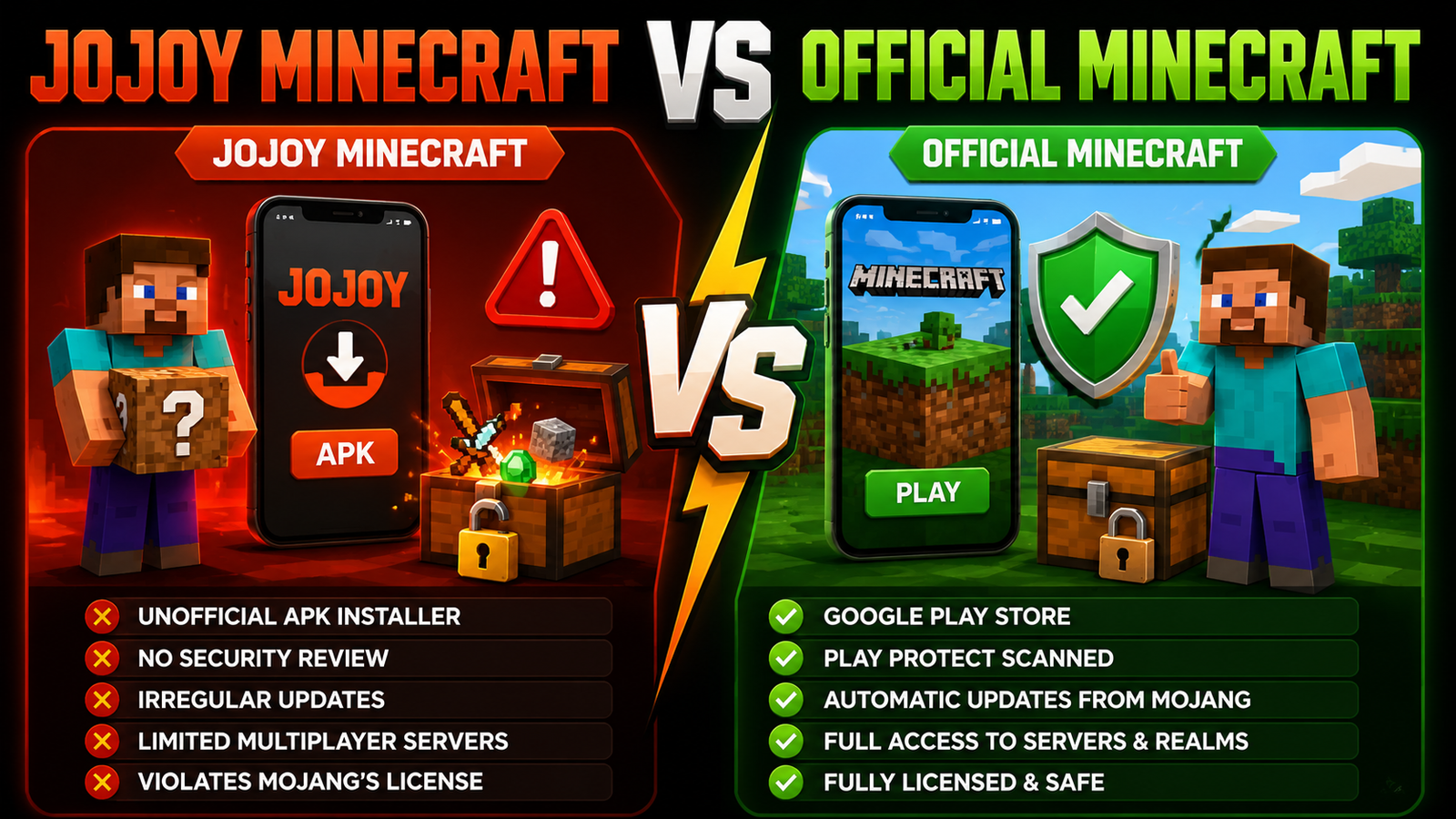
Jojoy Minecraft Vs Official Minecraft
Here is how the two compare side by side once the marketing claims are set aside.
| Category | Jojoy Minecraft | Official Minecraft |
|---|---|---|
| Cost | Free download | About seven dollars |
| Source | Unofficial APK installer | Google Play Store |
| Security Review | None | Play Protect scanned |
| Updates | Irregular, depends on the uploader | Automatic, direct from Mojang |
| Multiplayer Servers | Limited or unreliable | Full access to online servers and Realms |
| Legal Status | Violates Mojang’s license | Fully licensed |
The price difference is real, but so is everything else on that list. Official Minecraft costs more upfront. Yet it comes with guaranteed security scanning and reliable updates. It also gives full access to multiplayer servers without the risk of a banned account. Once you factor in the price of a new phone, the math changes. A bit of malware damage, and the seven-dollar gap starts to look small.
Common Problems Users Report
- Jojoy Minecraft not installing: Android often blocks the APK file automatically because it was never verified through Play Protect.
- App crashes after launch. Repackaged code frequently breaks once a new Minecraft update changes something the modder has not patched yet.
- Black screen issue: a common symptom of corrupted or incomplete files downloaded from an unofficial APK installer page.
- Download failed error: Many of these sites bundle multiple redirect ads that interrupt the actual file download.
- Unable to join multiplayer servers: without an authenticated Microsoft account, official online servers and Realms generally reject the connection.
- Performance and lag problems happen often. Modified builds are not optimized by Mojang’s own engineers, so stability issues show up on a wide range of devices.
Can You Play Jojoy Minecraft With Friends?
Multiplayer is one of the biggest gaps between Jojoy Minecraft and the real thing. Local LAN worlds over the same Wifi network sometimes work, since that connection does not need Mojang’s servers at all. Reaching verified online servers is a different story. Most of them check for a legitimate, signed-in account before letting anyone join. Without that authentication, a modded copy is far more likely to get stuck on a loading screen. Landing in an actual multiplayer server alongside friends is much less likely.
Best Alternatives To Jojoy Minecraft
Official Minecraft From The Google Play Store
Buying directly from the Play Store remains the simplest path. The seven-dollar price covers automatic updates, full multiplayer access, and Play Protect scanning on every single update.
Minecraft Trial Version
Mojang offers an official Minecraft Trial. It lets new players test survival mode and creative mode for free before deciding whether to buy the full game. No modded APK is required.
Minecraft Education Edition
Minecraft Education Edition is a legitimate, school-focused version of the game. It has its own free trial option. The edition is built for classrooms. Anyone curious about a no-cost, legal way to explore the game can still use it.
TLauncher PE shows up often on lists like this one, but it deserves an honest correction that most articles skip. TLauncher is itself an unofficial, cracked launcher that lets people play Minecraft without buying it. That carries the same licensing problem as Jojoy, since neither one is sanctioned by Mojang. Calling it a safe or legal alternative simply isn’t accurate; it’s just a different unofficial path to the same risk. Recommending it as a fix is exactly the kind of advice that keeps people stuck in the same cycle.
Addons For Minecraft Apps
If mods are the real draw, there are safer places to look. Minecraft’s official Marketplace and trusted community addon sites offer custom maps, skins, and texture packs. None of these touches the base game’s code.
Pros And Cons Of Jojoy Minecraft
Advantages
- Free access to a paid game upfront.
- Curiosity satisfied with extra cosmetic items and texture packs.
- Installation is marketed as quick and simple on Android devices.
Disadvantages
- Real security concerns, since the APK file skips every safety check Google normally runs.
- Comes from an unofficial source with no accountability if something goes wrong.
- Compatibility issues are common, especially after Minecraft pushes a new update.
- Versions often run outdated code that breaks multiplayer gameplay entirely.
Tips For Playing Minecraft Safely On Android
- Keep your device updated, since security patches close holes that malware on unofficial APK installer sites tries to exploit.
- Scan any downloaded file with antivirus software before opening it, even if a site claims it is already virus-free.
- Avoid fake APK websites that mimic Jojoy or other modded stores just to collect ad revenue or harvest device data.
- Backup your worlds regularly, since a corrupted modded install can wipe local save files without warning.
- Use trusted sources only, meaning the Google Play Store, Apple App Store, or Mojang’s own official site.
Who Searches For Jojoy Minecraft?
- Casual players curious about free access who have not yet weighed the security tradeoff involved.
- Mod enthusiasts hoping for extra features would be better served by the official Marketplace instead.
- Parents and kids testing the game before buying it have a real need. The official Minecraft Trial already covers that need for free.
- Users searching for alternative install methods after hearing about Jojoy from a friend or a social media video.
Frequently Asked Questions
What Is Jojoy Minecraft?
It is a modified, unofficial version of Minecraft distributed through Jojoy. Jojoy is a third-party app store that offers paid Android games for free without the developer’s permission.
Is Jojoy Minecraft Free To Download?
Yes, that is the entire appeal. The free price tag comes with security and legal tradeoffs that the official version does not carry.
Is Jojoy Minecraft Safe For Android Devices?
Not reliably. The app skips Google’s Play Protect scanning. That means there is no independent guarantee that any specific download is free of malware.
Does Jojoy Minecraft Support Multiplayer?
It claims to, but it runs outside Mojang’s authentication system. That makes joining official online servers or Realms unreliable at best.
What Is The Difference Between Jojoy Minecraft And Official Minecraft?
Official Minecraft is built, signed, and updated by Mojang and sold through verified stores. Jojoy Minecraft is a repackaged copy distributed without that authorization.
What Are The Best Alternatives To Jojoy Minecraft?
The official Minecraft Trial and the full Play Store purchase are both legal, no-risk ways to play. Minecraft Education Edition and the official Marketplace for mods and skins round out the safe options.
Final Takeaway
Jojoy Minecraft might look like a clever way to skip the seven-dollar price tag. The real cost shows up later, though. It shows up in security risks and broken multiplayer. It also shows up the moment the license agreement gets violated by installing the app. The official Minecraft Trial already gives new players a free, legal way to test the game. The full Play Store version is also reasonably priced for what it includes. If saving money is the goal, there is a safer path. That trial period and the occasional Play Store sale beat any modded APK, Jojoy included. The few dollars saved today rarely feel worth it later. A modded install can break, get flagged, or, worse, cost far more in lost data than it ever saved.