GTA 5 Director Mode is one of the most powerful creative tools ever added to Grand Theft Auto V. It allows players to step beyond regular gameplay and take complete control of the game world. You can choose from hundreds of characters, spawn vehicles instantly, change weather conditions, adjust wanted levels, and create cinematic scenes that feel like a movie.
Many players know Director Mode exists, but few use it to its full potential. Whether you want to record gameplay clips, create storytelling gameplay videos, or simply experiment in a free roam environment, Director Mode offers almost endless possibilities.
This guide covers everything from unlocking the mode to advanced content creation techniques that can help both beginners and experienced GTA V players get more from the game.
What Is GTA 5 Director Mode?
GTA 5 Director Mode is a special sandbox feature created by Rockstar Games that gives players full creative control over the game world. Unlike normal gameplay, there are no missions forcing you in a particular direction. Instead, you become the director of your own scenes and action sequences.
Many players confuse Director Mode with Story Mode or Rockstar Editor. Story Mode focuses on the lives of Michael, Franklin, and Trevor. Rockstar Editor is designed for editing recorded footage. Director Mode sits between these two systems by allowing you to create custom situations before recording them.
One of the biggest reasons players use GTA 5 Director Mode is freedom. You can become a police officer, an animal, a gang member, or even special NPCs that normally appear only during certain missions. This level of character selection transforms GTA V into a creative playground.
For content creators, Director Mode serves as a complete production studio inside the game. Camera controls, scene customization tools, and environmental settings allow players to create videos that look far more professional than standard gameplay recordings.
Key Features Of GTA 5 Director Mode
Director Mode includes tools that significantly change how GTA V works. Instead of following mission objectives, players can customize almost every aspect of the experience.
Play As Different Characters
One of the most popular features is access to hundreds of playable NPCs. Through the Actors Menu, players can select civilians, gang members, military personnel, and Animal Characters. Some characters become available immediately, while others must be unlocked through gameplay progression.
Spawn Vehicles Instantly
Vehicle spawning removes the need to search across Los Santos for specific cars. Supercars, aircraft, emergency vehicles, and motorcycles can appear within seconds. This feature saves time and helps players create custom scenes more efficiently.
Change Weather Conditions
Weather customization allows complete environmental control. Players can switch between clear skies, rain, fog, storms, and other effects. Different weather settings can dramatically change the mood of a scene.
Modify Time Of Day
Time cycle settings let players choose sunrise, daylight, sunset, or nighttime. Combining weather and lighting options creates more cinematic visuals for recordings.
Adjust Wanted Levels
Wanted level control is particularly useful when building action sequences. You can instantly create police chases or remove law enforcement pressure entirely, depending on the scene you want to create.
Create Custom Scenes And Videos
Perhaps the biggest strength of Director Mode is scene customization. Players can combine characters, vehicles, weather effects, and locations to build unique scenarios that would never occur naturally during gameplay.
How To Unlock GTA 5 Director Mode
Accessing Director Mode is relatively simple, but some players are unsure why certain characters or features remain locked.
Requirements For Story Mode Players
Director Mode is available within GTA V Story Mode. Players must have access to the game’s main menu systems before using it. A legitimate and updated version of the game is also required.
Unlocking Characters Through Gameplay
Many characters become available only after encountering them during missions. Rockstar designed this system to encourage exploration. Completing missions, meeting new NPCs, and progressing through the story naturally expand your casting options.
A useful tip that many articles overlook is keeping separate save files. Different save progress levels can provide access to different groups of characters and situations.
Special Conditions And Restrictions
Certain mission-specific characters remain unavailable because they are tied to story events. Some animals also require specific unlock conditions before appearing in the Casting Options menu.
Players using Director Mode should remember that progress made inside the mode does not carry over into Story Mode. Think of it as a creative sandbox rather than a progression system.
Access Director Mode on All Platforms
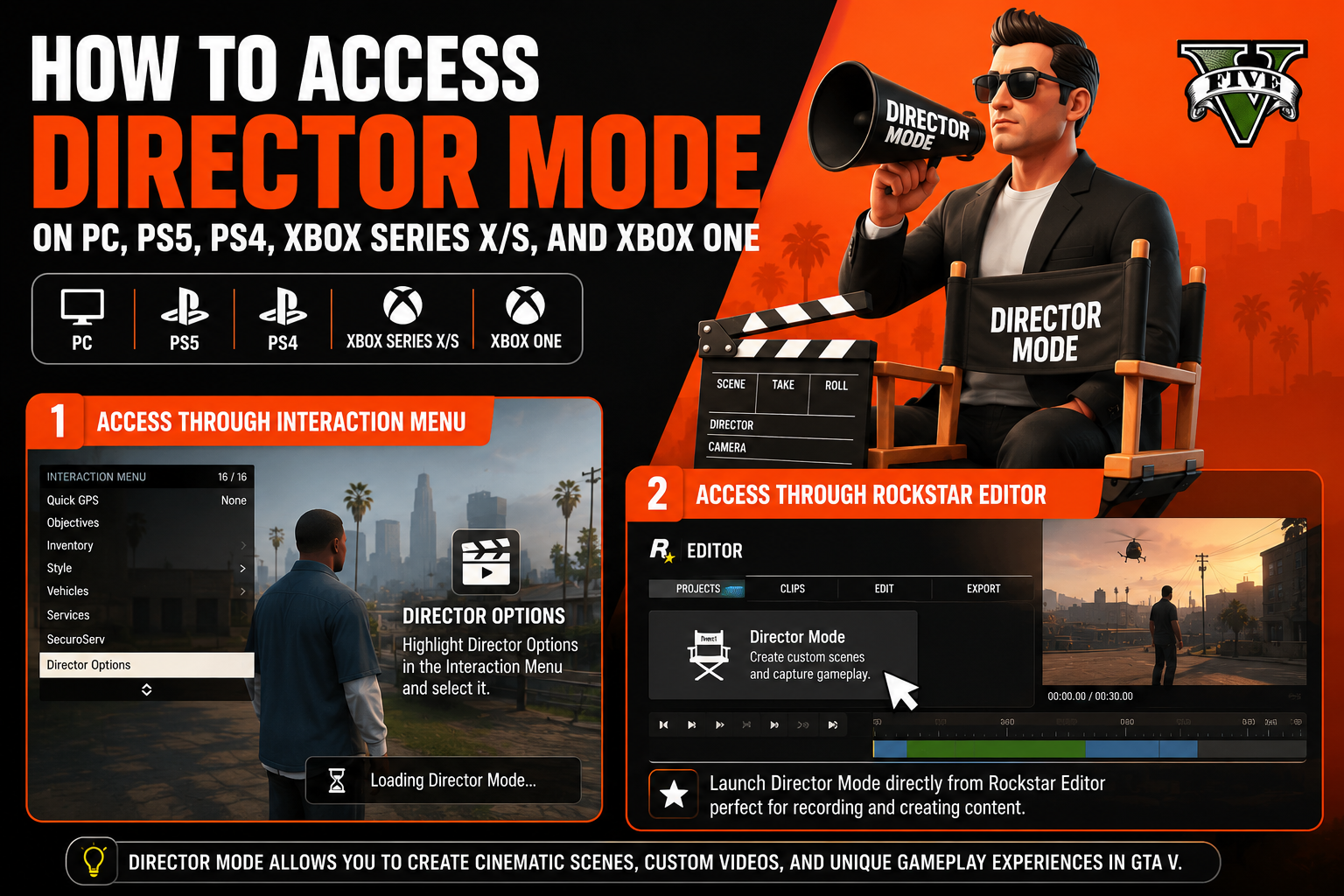
How To Access Director Mode On PC, PS5, PS4, Xbox Series X/S, And Xbox One
Rockstar has made Director Mode available across multiple platforms, although menu navigation can vary slightly.
Access Through Interaction Menu
The fastest method involves opening the Interaction Menu while playing GTA V. From there, scroll until you find Director Options and select it. After a brief loading screen, the mode will launch.
Access Through Rockstar Editor
Another option is entering Rockstar Editor first. Once inside, players can launch Director Mode directly through the editor interface. This method is often preferred by content creators who plan to record footage immediately.
Platform Specific Instructions
| Platform | Access Method |
| PC | Interaction Menu or Rockstar Editor |
| PS4 | Interaction Menu |
| PS5 | Interaction Menu |
| Xbox One | Interaction Menu |
| Xbox Series X S | Interaction Menu |
Most players use the Interaction Menu because it requires fewer steps. After entering Director Mode, you gain access to the Actors Menu, Settings Menu, and multiple customization options.
Imagine you want to recreate a Hollywood-style car chase through downtown Los Santos. Within a few minutes, you can select characters, spawn vehicles, adjust weather conditions, set a wanted level, and begin recording. Very few games offer this level of creative freedom without mods.
GTA 5 Director Mode Character Categories
One of the biggest reasons players enjoy GTA 5 Director Mode is the massive variety of characters available through the Actors Menu. Instead of being limited to Michael, Franklin, or Trevor, you can take control of hundreds of unique characters found throughout Los Santos and Blaine County.
Story Characters
Story characters include the main protagonists and many important NPCs from GTA V’s campaign. Playing as familiar faces allows you to create scenes that feel connected to the original storyline while adding your own creative twists.
Many content creators use story characters to build alternative storylines. For example, you can place Trevor in situations that never happened during the official campaign and record entirely new adventures.
Online Characters
Players who spend time in GTA Online can also use their Online Protagonist in Director Mode. This feature is useful because it allows creators to record custom content using their own character design and appearance.
Since GTA Online characters often represent hundreds of hours of customization, many players prefer using them instead of standard NPCs.
Animals
Animal Characters are among the most entertaining options available. You can become a dog, cat, deer, bird, or other wildlife found throughout the game world.
This category often leads to some of the funniest gameplay moments. Running through Los Santos as a mountain lion or creating wildlife action sequences gives players a completely different perspective of GTA V.
Emergency Services
Emergency Services NPCs include police officers, firefighters, paramedics, and security personnel. These characters are perfect for building realistic rescue missions, law enforcement scenarios, or large-scale emergency events.
Many YouTube creators use these characters when producing roleplay content because they add authenticity to the scene.
Gang Members
Gang members allow players to create street conflicts, turf battles, and criminal storylines. Different gangs have distinct appearances and behaviors that help make scenes feel more realistic.
Combining gang characters with vehicle spawning and wanted level control can produce action-packed scenarios within minutes.
Military Personnel
Military characters provide access to soldiers and tactical units. These actors are especially useful when creating large combat scenes involving tanks, helicopters, and military vehicles.
Players interested in action movies often use military NPCs to recreate battle sequences inspired by popular films.
Special And Unique NPCs
Some of the most interesting characters belong to this category. You may find celebrities, mission-specific characters, and unusual NPCs that rarely appear during normal gameplay.
Exploring these options often reveals hidden possibilities that many players never discover during regular Story Mode.
Best Director Mode Cheats And Settings
Director Mode includes several built-in tools that feel similar to cheats while remaining part of the official game. These settings help players create scenes more efficiently and experiment without limitations.
Invincibility Options
Invincibility is one of the most useful settings available. It allows characters to survive dangerous stunts, explosions, and crashes without interruption.
This option is especially valuable when recording footage because failed attempts no longer require restarting the entire sequence.
Super Jump And Special Abilities
Super Jump dramatically increases movement possibilities. Characters can leap across rooftops, clear obstacles, and perform cinematic movements that look impressive on camera.
Special abilities vary depending on the selected character and can add unique gameplay mechanics to your scenes.
Explosive Effects
Explosive ammunition and explosive melee attacks create visually dramatic action sequences. Large explosions often make scenes feel more intense and cinematic.
Used carefully, these effects can transform a simple chase into a memorable action set piece.
Unlimited Vehicle Access
Vehicle spawning combined with unlimited access removes traditional gameplay restrictions. Players can instantly switch between sports cars, aircraft, emergency vehicles, and military equipment.
This flexibility speeds up content creation and reduces setup time significantly.
Fast Character Switching
Changing actors quickly is important when testing ideas. Director Mode allows seamless transitions between different character types without lengthy loading screens.
Experienced creators often switch characters multiple times while building a single scene.
How To Spawn Vehicles In Director Mode
Vehicle spawning is one of the most frequently used Director Mode features. Instead of searching the map, players can instantly access the exact vehicle needed for a scene.
Sports Cars
Sports cars are ideal for street races, city driving, and high-speed pursuits. Their balance of speed and handling makes them useful for many different scenarios.
Popular choices often include luxury models that fit naturally into cinematic city scenes.
Supercars
Supercars provide maximum performance and visual appeal. These vehicles are commonly used in action videos because they look impressive and deliver exceptional speed.
Combining supercars with custom weather settings can create movie-quality driving footage.
Aircraft And Helicopters
Aircraft open entirely new creative possibilities. Helicopters allow aerial tracking shots while planes support large-scale action sequences across the map.
Many advanced creators use helicopters as moving camera platforms when recording gameplay clips.
Military Vehicles
Military vehicles bring power and spectacle to any production. Tanks, armored transports, and combat equipment work particularly well during battle scenes.
When paired with military NPCs, these vehicles can create realistic combat scenarios inside the open world environment.
Emergency Vehicles
Police cars, ambulances, and fire trucks remain popular choices for roleplay content. Emergency vehicles help establish realistic situations and often become central parts of rescue or pursuit stories.
A useful strategy is combining emergency vehicles with Emergency Services NPCs to create scenes that feel authentic and believable.
How To Change Weather And Time In Director Mode
Environmental controls are often overlooked, yet they have a huge impact on visual quality. Weather customization and time cycle settings can completely transform the atmosphere of a scene.
Sunny Weather
Clear weather provides maximum visibility and vibrant colors. This setting works well for vehicle showcases, exploration videos, and daytime action sequences.
Bright lighting also helps improve recording quality, especially for players using basic capture equipment.
Rainy Conditions
Rain adds drama and realism. Wet roads create reflections that make city environments appear more cinematic.
Police chases and street racing scenes often look better during rain because of the added visual depth.
Snow Effects
Snow is one of the rarest environmental settings in GTA V. Many creators use it because it instantly changes the appearance of Los Santos.
Winter-themed videos become much more engaging when snow effects are active.
Thunderstorms
Thunderstorms introduce dark skies, lightning flashes, and intense atmosphere. These conditions are excellent for horror-themed projects and dramatic action sequences.
A simple scene can feel completely different once storm effects are enabled.
Sunrise, Daytime, Sunset, And Night Settings
Time cycle settings control lighting and mood. Sunrise offers warm colors and soft shadows. Daytime delivers clear visibility. Sunset creates cinematic golden lighting. Nighttime introduces city lights and a completely different visual style.
One advanced tip is matching time settings with your scene’s purpose. High-energy action often works best during daylight, while storytelling gameplay can become more immersive during sunset or nighttime conditions.
Creating Cinematic Videos With Director Mode
Director Mode becomes even more powerful when combined with creative camera work and thoughtful scene planning. Many of the most popular GTA V videos on YouTube were created using tools already built into the game.
Camera Controls And Angles
Good camera controls can make the difference between an average video and a professional-looking production. Director Mode allows players to adjust perspectives, follow subjects, and capture action from multiple viewpoints.
Wide shots work well for showcasing large environments. Close shots highlight character emotions and important details. Dynamic camera movement helps action sequences feel more exciting and realistic.
Many creators spend more time setting up camera positions than recording actual footage. That extra effort often produces better results.
Using Rockstar Editor Together With Director Mode
Director Mode and Rockstar Editor work best when used together. Director Mode creates the scene, while Rockstar Editor refines the final product.
After recording gameplay clips, players can enter the Rockstar Editor and adjust camera movement, add effects, and improve scene transitions. This workflow is used by many experienced GTA content creators.
A common mistake is rushing straight into editing. Recording multiple camera angles first gives you far more flexibility later.
Recording High Quality Gameplay Footage
Quality recordings start with preparation. Adjust weather customization, character selection, vehicle spawning, and environmental settings before recording begins.
Reducing unnecessary traffic and distractions often improves visual quality. Smooth gameplay is equally important because frame drops can make cinematic footage look less professional.
Many successful creators record the same scene several times from different perspectives. This approach provides more editing options and often results in stronger final videos.
Storytelling And Machinima Tips
Storytelling gameplay works best when scenes have a clear purpose. Every character, vehicle, and location should contribute to the narrative.
Imagine creating a police pursuit through downtown Los Santos. Emergency Services NPCs chase a suspect while helicopters monitor the action from above. A simple setup suddenly feels like a scene from a crime drama.
Small details often make the biggest difference. Character movement, weather conditions, and timing can transform ordinary gameplay into memorable machinima content.
Best GTA 5 Director Mode Ideas And Challenges
Many players enter Director Mode without knowing what to create. Fortunately, the feature supports countless creative possibilities.
Movie Scene Recreation
Recreating famous movie moments remains one of the most popular uses for Director Mode. Action films, crime thrillers, and military movies all inspire.
Matching locations, vehicles, and character appearances can produce surprisingly accurate recreations.
Police Chase Scenarios
Police chases are perfect because GTA V already contains realistic law enforcement systems. Wanted level control allows you to adjust difficulty and intensity instantly.
Adding helicopters and multiple police units creates dramatic action sequences that feel authentic.
Zombie Survival Roleplay
Although GTA V does not officially include zombies, creative players often use NPCs and environmental effects to simulate survival scenarios.
Nighttime settings and stormy weather help create a tense atmosphere.
Military Battle Simulations
Military personnel, combat vehicles, and open landscapes provide everything needed for large-scale battles.
Combining aircraft with ground forces can create impressive scenes that showcase the scale of GTA V’s world.
Superhero Themed Videos
Many content creators use costumes and custom scenarios to create superhero-inspired stories. Special abilities and cinematic camera work help these projects stand out.
Funny NPC Experiments
Not every project needs to be serious. Some of the most viewed GTA videos involve unusual NPC behavior and unexpected situations.
Experimenting with different characters often leads to entertaining moments that cannot be planned.
Director Mode Vs Rockstar Editor
New players often wonder whether they should use Director Mode or Rockstar Editor. Both tools are valuable, but they serve different purposes.
Main Differences
| Feature | Director Mode | Rockstar Editor |
| Scene Creation | Yes | No |
| Character Selection | Yes | Limited |
| Camera Editing | Basic | Advanced |
| Video Production | Limited | Extensive |
| Real Time Gameplay | Yes | No |
Director Mode focuses on creating situations. Rockstar Editor focuses on refining recorded footage.
When To Use Director Mode
Use Director Mode when you want control over characters, vehicles, weather, and gameplay conditions.
This tool is ideal for building scenes from scratch and experimenting with ideas.
When To Use Rockstar Editor
Rockstar Editor becomes useful after recording is complete. It offers advanced camera controls and editing tools that improve presentation quality.
Many creators consider it the final stage of the production process.
Combining Both For Better Content Creation
The strongest results come from using both systems together.
Build scenes in Director Mode, record multiple gameplay clips, then edit everything inside Rockstar Editor. This workflow delivers the highest quality results available within GTA V.
Common GTA 5 Director Mode Problems And Fixes
Even though Director Mode is reliable, players occasionally encounter technical issues.
Director Mode Not Showing
If Director Mode does not appear, verify that GTA V is fully updated. Restarting the game often resolves menu-related problems.
Corrupted files may also prevent certain features from loading correctly.
Missing Characters
Missing characters usually occur because they have not been unlocked through Story Mode progression.
Completing additional missions often expands available Casting Options.
Loading Issues
Long loading times can result from limited system resources or background applications.
Closing unnecessary programs may improve performance.
Game Crashes Or Freezes
Outdated drivers and unstable game files remain common causes of crashes.
Verifying game files through the launcher can often solve these problems quickly.
Settings Not Saving
Some settings reset after leaving Director Mode. Always confirm important adjustments before beginning a recording session.
Creating test recordings can help verify that configurations remain active.
Advanced Director Mode Tips For Content Creators
Experienced creators often use techniques that casual players never discover.
Creating Professional Cinematic Shots
Professional-looking footage relies on movement, composition, and timing.
Avoid keeping the camera completely static. Gentle movement creates a more natural viewing experience.
Using Multiple Characters Effectively
Scenes become more believable when several characters interact naturally.
Mixing civilians, police officers, and special NPCs can make environments feel alive.
Improving Video Quality
Higher resolution recordings produce sharper results. Stable frame rates are equally important.
Good visual quality starts before editing begins.
Optimizing Performance For Recording
Reducing unnecessary visual clutter can improve recording performance.
A smoother recording session often produces cleaner footage and better final results.
Building Unique Scenarios
One overlooked strategy is combining unrelated game systems.
For example, placing Animal Characters inside urban environments creates unusual and memorable scenes that viewers rarely see elsewhere.
Originality often separates average content from standout content.
Is Director Mode Available In GTA Online?
Director Mode is not fully available inside GTA Online gameplay sessions. Rockstar designed it primarily as a Story Mode feature.
Players can use their Online Protagonist inside Director Mode, but the actual mode operates separately from online servers.
This limitation exists partly because Director Mode grants access to powerful tools such as invincibility settings, vehicle spawning, and environmental controls. Allowing those features inside GTA Online would create obvious balance problems.
For content creation purposes, however, most players will not notice any significant limitations. Nearly every major creative feature remains accessible.
Frequently Asked Questions
What Is GTA 5 Director Mode?
GTA 5 Director Mode is a creative sandbox tool that allows players to control characters, vehicles, weather conditions, and gameplay settings to create custom scenes and videos.
How Do I Unlock Director Mode In GTA 5?
Director Mode can be accessed through Story Mode after launching the game and opening the Interaction Menu or Rockstar Editor.
Can I Use Director Mode In GTA Online?
No. Director Mode functions separately from GTA Online, although players can use their Online Protagonist inside the mode.
How Do I Spawn Any Vehicle In Director Mode?
Open the Director Options menu, access vehicle spawning features, and select the vehicle category you want to use.
Can I Play As Animals In GTA 5 Director Mode?
Yes. Animal Characters are available in Director Mode once the required unlock conditions have been met.
Does Director Mode Work On PS5 And Xbox Series X/S?
Yes. Director Mode is available on modern consoles as well as PC, PS4, and Xbox One.
What Is The Difference Between Director Mode And Rockstar Editor?
Director Mode creates scenes and gameplay situations, while Rockstar Editor focuses on editing recorded footage and improving video presentation.
Why Is Director Mode Not Appearing In My GTA 5 Menu?
This usually happens because of outdated game files, installation issues, or missing updates. Restarting the game and verifying files often fixes the problem.
Final Thoughts
GTA 5 Director Mode remains one of the most impressive creative tools ever included in an open-world game. Character selection, vehicle spawning, weather customization, wanted level control, and cinematic camera controls give players complete freedom to shape their own experiences.
Many people use the feature only once or twice before returning to regular gameplay. That is a mistake. Director Mode offers hundreds of hours of experimentation, content creation, and storytelling opportunities that most players never fully explore.
Whether you want to record action sequences, build custom roleplay scenarios, create machinima videos, or simply experiment with playable NPCs, GTA 5 Director Mode provides tools that still rival modern game creation systems.
The best approach is simple: enter Director Mode, test every menu, experiment with different settings, and start creating scenes. You will quickly discover why it remains one of GTA V’s most powerful and underrated features.