Mods and custom content are about to become a big part of how players experience Paralives. As the game moves closer to full release, the modding community is already building tools, visual assets, and gameplay enhancements that expand what the base game offers. Installing them incorrectly, however, can corrupt save files, crash your game, or introduce malware to your PC. This Paralives mods guide covers everything from understanding what mods and custom content actually are, to finding the correct mod folder location on PC, downloading safely from Nexus Mods, and keeping your game running cleanly after every update.
What Are Mods And Custom Content In Paralives?
Understanding Paralives Mods
Mods are user-generated files that change or add to the existing game. In Paralives, a mod could change how a gameplay system works, add new options to the character creation screen, or introduce entirely new features that the base game does not include. These files are created by players and independent developers, not by Paralives Studio, which means quality and safety can vary depending on where you download them from.
Modding has been central to life simulation games for decades. The Sims franchise built one of the largest modding communities in gaming history, and Paralives is positioned to attract a similarly passionate group of creators. The development team at Paralives Studio has been supportive of community creativity, which signals that modding will be an encouraged part of the game’s long-term ecosystem.
Understanding what you are installing before you install it is the most important habit you can build as a modder. Some mods are simple cosmetic additions that change the appearance of items. Others are script mods that run code inside the game engine, which carry more risk if something goes wrong or conflicts with another file.
What Counts As Custom Content (CC)?
Custom content refers specifically to new visual assets created by the community and added to the game. This includes things like hairstyles, clothing pieces, furniture, wall coverings, flooring, and decorative objects. Unlike gameplay mods, custom content does not change how the game functions. It simply adds more choices to the options already in the game.
Custom content packages are typically smaller files that drop into the mods folder alongside gameplay mods. A single CC creator might release hundreds of individual items over time, so players who enjoy collecting custom content often end up managing large libraries of files.
How Mods Change Gameplay?
Gameplay mods change the rules, systems, or mechanics of the simulation. A mod might adjust how fast a Para gains a skill, change the way relationships develop, add new career paths, or introduce entirely new gameplay loops. These modifications directly affect your experience of playing the game rather than just how it looks.
Script mods fall into this category. They work by injecting code into the game at runtime, which is why they are more powerful and more potentially disruptive than visual content. When a game update changes the underlying code, script mods built for the previous version can break, produce errors, or conflict with other installed files.
How Custom Content Enhances Visual Customization?
Custom content extends the visual range of Paramaker and the build mode. Where the base game might offer thirty hairstyle options, a well-developed CC library can bring that number into the hundreds. Players who want hyper-specific aesthetics, whether that means a particular cultural clothing tradition, a specific architectural style for their homes, or a niche fashion aesthetic, rely on custom content to fill those gaps.
Why Players Use Mods In Life Simulation Games?
Life simulation players tend to engage deeply with their game worlds over many hours. The desire to personalize every detail of a household, neighborhood, or character is core to the genre’s appeal. Mods and custom content extend the game’s lifespan significantly by keeping the experience fresh and tailored to individual taste.
Gameplay Mods vs Custom Content
What Gameplay Mods Do
Gameplay mods touch the functional side of the simulation. They can make careers more detailed, add new traits, expand relationship mechanics, or fix bugs that the developer has not yet patched. A mod might make weather affect mood more realistically or add consequences for neglecting a Para’s basic needs.
These mods require more attention from the player because they interact directly with game systems. When Paralives releases a patch, gameplay mods are the first type to potentially break, and broken script mods can cause crashes or prevent the game from launching at all.
What Custom Content Does
Custom content is purely additive on the visual side. It does not change rules or mechanics. It adds options. Installing a new set of kitchen cabinets as CC will not change how cooking works in the game. It simply gives you more visual choices when designing a kitchen.
Because CC is less technically integrated into the game engine, it is generally more stable across game updates. A hairstyle pack that worked before a patch will usually still work after, unless the patch changes how hair rendering works at a foundational level.
Script Mods Vs Visual Mods
The clearest way to understand the difference is this: script mods run code, visual mods add assets.
| Feature | Script Mods | Visual Mods and CC |
| Changes gameplay mechanics | Yes | No |
| Runs code in the game engine | Yes | No |
| Breaks after game patches | Often | Rarely |
| Risk level | Higher | Lower |
| Typical file types | .py, .cs, script files | .package, texture files |
| Best for | Gameplay overhauls | Appearance and decor |
Paralives CC Script Mods Difference
The practical difference that matters most is stability and risk. Script mods give you powerful gameplay changes but require active maintenance. Custom content gives you visual variety with much less chance of causing problems. For most players, a library of CC with a small number of well-maintained script mods is the sweet spot.
Which Type Should Beginners Install First?
Start with custom content. It is lower risk, easier to remove if something does not look right, and gives you an immediate visible payoff without touching any game systems. Once you are comfortable with how the mods folder works and how to organize files, start adding a few carefully chosen script mods from established creators.
Before Installing Paralives Mods
Check Game Version Compatibility
Every mod is built for a specific version of the game. Before downloading anything, check the mod description for compatibility notes. Installing a mod built for an older version of Paralives can cause anything from minor visual glitches to game-breaking crashes. Most reputable mod pages list the game version they were last tested with.
Create A Save Backup
Before installing any mod for the first time, back up your save files. Copy the entire save folder to a separate location on your hard drive or an external drive. If a new mod corrupts your save or causes problems, you have a clean version to restore from. This step takes two minutes and can save hours of rebuilding.
Understand Mod Requirements
Some mods depend on other mods to function. These dependencies are called requirements and are usually listed clearly on the download page. If a mod requires a specific framework or base file and you do not have it installed, the mod either will not work or will cause errors. Always install required files first.
Recognize Trusted Mod Sources
Nexus Mods is the largest and most trusted platform for game mods across many titles, and it will likely be a primary hub for Paralives mods. Community platforms affiliated with the official Paralives community are also reliable. Personal creator websites can be safe, but require more scrutiny. Avoid downloading mods from random social media links, unofficial forums, or file-sharing sites with no community moderation.
Common Risks Of Unsafe Downloads
Malicious files disguised as mods are a real concern. A ZIP archive labeled as a furniture pack could contain executable files that install malware. Always download from sites with active moderation, check file types before opening, and scan downloads with antivirus software before extracting.
How To Install Paralives Mods Step By Step?
Downloading A Mod File
Go to your trusted source, find the mod you want, and click the download link. Mod files for Paralives will typically come as ZIP or RAR archives. Save the downloaded file somewhere easy to find, like your desktop or a dedicated downloads folder, before doing anything else with it.
Extracting ZIP Or RAR Archives
You need software to extract compressed archives. Windows 11 can handle ZIP files natively through right-click extraction. For RAR files, free programs like 7-Zip or WinRAR handle extraction reliably. Right-click the archive, select your extraction option, and choose a destination folder. Do not try to drag files directly out of a compressed archive without fully extracting first, as this can result in incomplete file copies.
Finding The Correct Installation Folder
The mods folder is where all your mods and custom content files need to go. Placing files anywhere else means the game will not read them. The exact path is covered in detail in the folder location section below, but the general principle is the same: locate the official Paralives mods directory and place extracted files inside it.
Moving Files Into The Mods Directory
After extracting, open the mods folder and move your extracted files in. Some mods come as a single file. Others come with multiple files that all need to be present in the folder to work correctly. Check the mod’s installation instructions to confirm whether subfolders are needed or whether all files should sit at the root of the mods directory.
Launching The Game And Testing Mods
Launch Paralives after adding your new files. If the game opens without errors, navigate to the area where the mod should appear. A new hairstyle will appear in Paramaker. A gameplay mod might show effects during active play. Check that the mod is functioning as described on its download page.
Verifying Successful Installation
If nothing seems different after installing a mod, check the following in order: confirm the files are in the correct folder, verify the game version matches the mod’s requirements, check that all required dependency files are also installed, and restart the game if you installed files while it was running.
Step-by-Step Installation Checklist
- Download the mod file from a trusted source
- Scan the downloaded archive with antivirus software
- Extract the ZIP or RAR archive fully
- Locate the Paralives mods folder on your PC
- Place extracted files into the mods directory
- Launch the game and confirm the mod appears or functions correctly
Finding The Mods Folder
Paralives Mod Folder Location On PC
Default Mods Folder Location
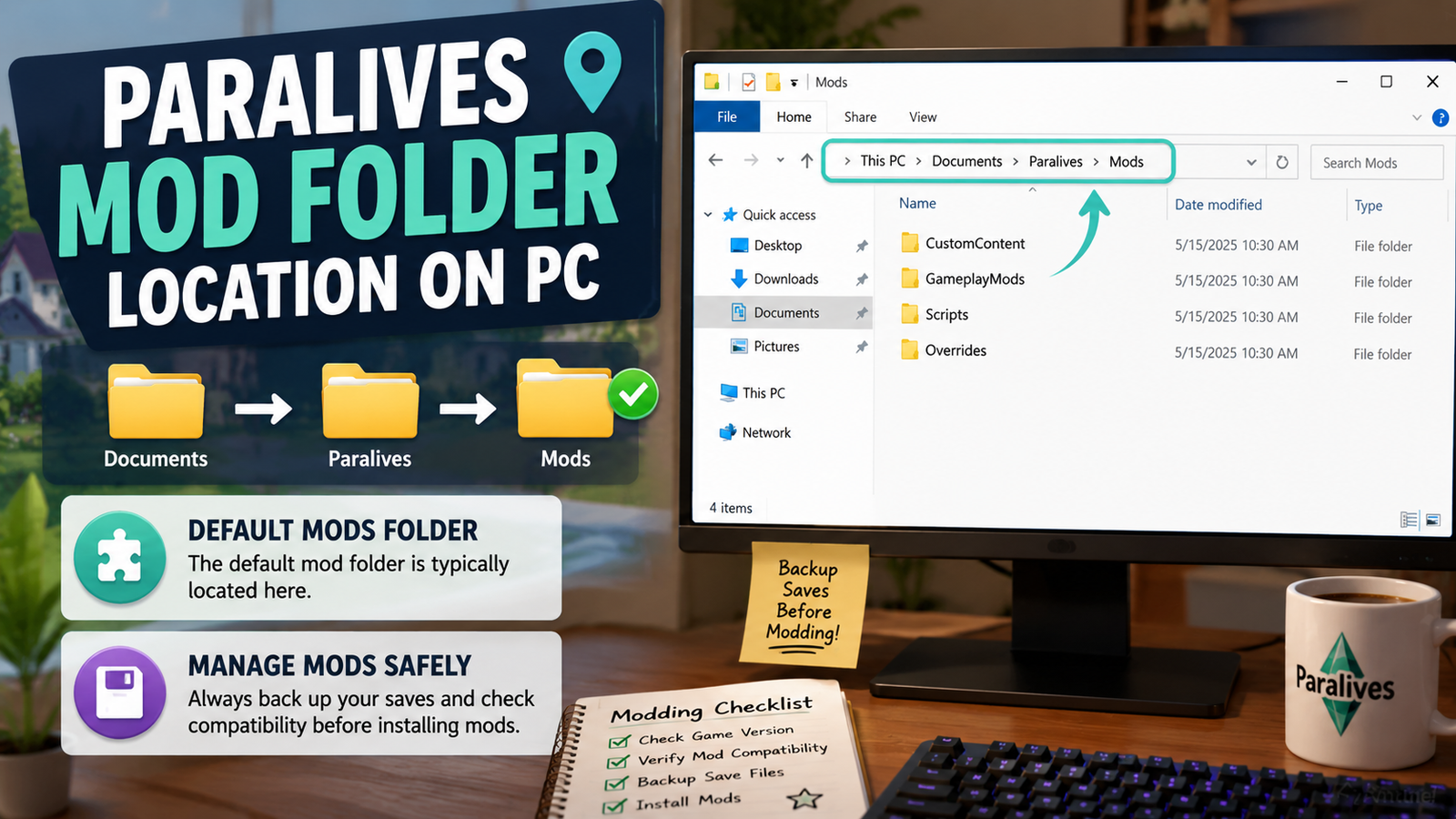
Once Paralives establishes its official mod support structure, the mods folder will follow a standard location pattern similar to other games in the genre. On Windows PC, this is typically found inside the Documents folder under a game-specific subdirectory. The general path looks like this:
Documents > Paralives > Mods
Until official documentation confirms the exact path at launch, check the game’s settings menu or any official modding documentation released by Paralives Studio, as developers usually provide this path directly.
Save Files Vs Mods Folder
Save files and mod files live in different locations. Your save files will be in a Saves folder within the same Paralives directory. Placing mod files in the saves folder or save files in the mods folder will cause problems. Keep them separate and clearly labeled.
Windows Installation Paths
On most Windows setups, the full path to your mods folder will look something like this:
Replace YourUsername with your actual Windows account name. If you have changed your Documents folder location to a different drive, the path will start from wherever your Documents folder is currently stored.
Managing Multiple Mod Folders
If you want to test mods before committing to them in your main game, consider maintaining two separate save profiles, each with its own mod configuration. This way, experimental or unproven mods stay separate from a save file you care about.
How To Quickly Access The Mods Directory?
Create a shortcut to your mods folder and place it on your desktop. This saves time when you are installing new content regularly. You can also pin the folder to your Quick Access sidebar in Windows Explorer for one-click access.
Why Use Nexus Mods?
What Is Nexus Mods?
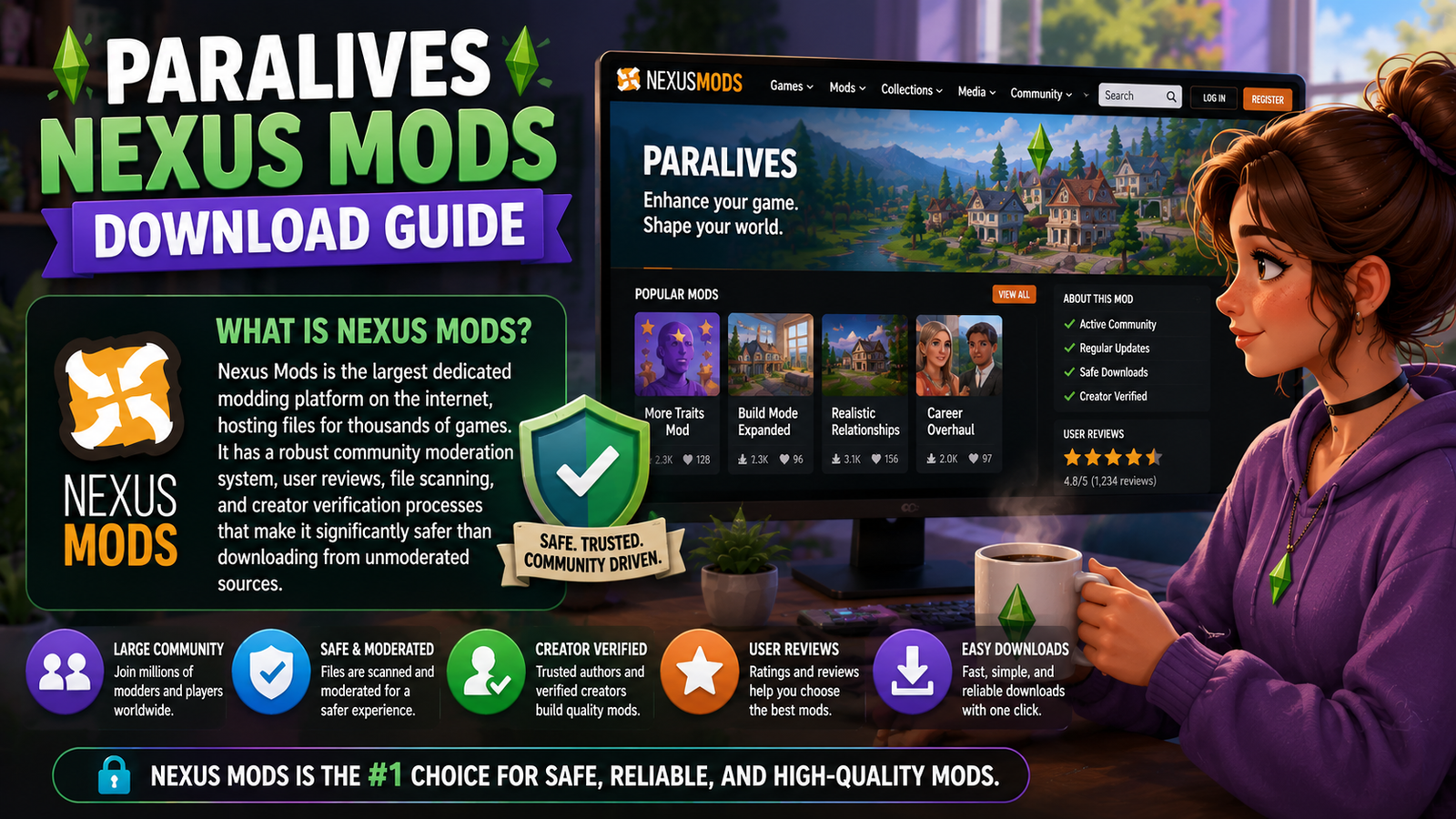
Nexus Mods is the largest dedicated modding platform on the internet, hosting files for thousands of games. It has a robust community moderation system, user reviews, file scanning, and creator verification processes that make it significantly safer than downloading from unmoderated sources. Major life simulation games, RPGs, and open-world titles all have large Nexus communities.
Creating A Nexus Mods Account
A free Nexus Mods account lets you download files, leave reviews, track updates to mods you have installed, and engage with creators. Go to nexusmods.com, register with an email address, and verify your account. A premium membership removes download speed limits but is not required.
Finding Compatible Paralives Mods
Once Paralives mods appear on Nexus, use the search bar to filter by game and then browse by category, popularity, or upload date. Pay attention to the “Last Updated” date on each mod page. A mod that was last updated six months before a major game patch is likely out of date.
Reading Mod Descriptions Properly
Every mod page on Nexus includes a description tab written by the creator. This section tells you what the mod does, which game version it was built for, what files it requires, and how to install it. Read the full description before downloading. Skipping this step is the most common reason players end up with mods that do not work correctly.
Understanding Mod Requirements
The Requirements tab on a Nexus mod page lists any files you need to have installed before the mod will work. Some mods need a scripting framework. Others need a base content file from another creator. Install these requirements in the correct order before adding the main mod file.
Downloading Mods Safely
Use the Manual Download option if you prefer to manage files yourself, or use the Vortex mod manager if you want an automated approach. Either method is safe when used through the official Nexus interface. Avoid third-party sites that mirror Nexus files, even if the files appear identical, because you lose the safety net of Nexus moderation.
Installing Nexus Mods Files Correctly
After downloading, follow the same extraction and placement process described in the installation steps above. Nexus mods come in the same archive formats as any other mod source. Extract fully, check the file contents match what the description says you should see, and place everything in the correct folder.
Paralives Custom Content CC Install Guide
Downloading CC Packages
Custom content from community creators usually comes as package files or loose texture and mesh files. Download from the creator’s official page, whether that is Nexus Mods, a personal portfolio site, or a dedicated CC sharing community. Confirm the file format matches what Paralives supports before downloading.
Installing Hairstyles, Clothing, And Furniture
Place extracted CC files directly into the Mods folder. Hairstyle and clothing packs will appear in Paramaker once the game reads the files from that folder. Furniture and decor items will appear in the build-and-buy mode catalog. If items are not showing up, confirm the files are in the right location and that the game was fully restarted after installation.
Organizing Custom Content Files
Create subfolders inside your Mods directory to organize CC by type. A folder called CC Clothing, another called CC Hair, and another called CC Furniture make finding and removing specific content much easier later. Most games support this subfolder structure without any issues.
Testing New Custom Content
Imagine you have just downloaded a set of twenty new furniture pieces from a community creator. You install them and launch the game, only to find that one item has a broken texture that covers other nearby objects with pink squares. By installing one batch at a time rather than fifty packs at once, you can identify exactly which file caused the problem without needing to check every single item manually.
Removing Broken CC
If a custom content file causes visual glitches or errors, locate the specific file in your Mods folder and delete it. Relaunch the game and confirm the problem is gone. If you organized your CC into subfolders by type and creator, finding the specific file takes seconds rather than minutes.
Types Of Paralives Mods You Can Install
Gameplay Enhancement Mods
These mods improve or expand the core simulation mechanics. Better career progression systems, more nuanced mood modeling, expanded skill trees, and deeper relationship dynamics all fall into this category. Gameplay enhancement mods are the most impactful type, but also carry the highest risk of updates.
Career And Job Mods
Career mods add new job paths, expand existing careers with more levels, or rework how work mechanics function day to day. Players who want specific professions not included in the base game often rely on community-built career mods to fill those gaps.
Relationship And Social Mods
Social simulation is central to any life simulation game. Mods in this category might add new relationship types, expand dialogue options, change how quickly friendships or romances develop, or introduce social consequences that the base game does not model.
Personality Expansion Mods
These mods add new traits, quirks, or behavioral tendencies that go beyond the base trait system. A broader palette of personality options creates more unique and interesting characters to play with over long game sessions.
Build Mode Mods
Build mode mods expand architectural options, add new wall and floor types, introduce structural elements not included in the base game, or improve the tools available for constructing and decorating homes. These often come as a combination of script functionality and custom content assets.
Character Creation Mods
Mods that expand Paramaker add new morphing options, additional body types, more detailed skin features, or entirely new cosmetic categories. Since Paramaker is already one of Paralives’ strongest features, character creation mods will likely be one of the most popular mod categories.
UI And Interface Mods
UI mods change how the game’s interface looks and functions. Cleaner panel layouts, adjusted font sizes, repositioned information displays, and custom color schemes all fall into this category. These mods are generally safe and stable across updates because they touch surface-level elements rather than core game systems.
Performance Optimization Mods
Some mods are specifically built to reduce load times, improve frame rates on lower-spec hardware, or reduce memory usage. These can be valuable for players running Paralives on older machines, but should be downloaded carefully because performance mods interact with the game engine at a low level.
How To Manage Mods Without Breaking Your Game?
Creating A Mod Organization System
Set up a clear folder structure inside your Mods directory before you start accumulating files. A disorganized mods folder becomes a serious problem when you need to find and remove a specific file quickly. The organization takes five minutes to set up and saves hours of troubleshooting later.
Naming Folders Properly
Use descriptive names that tell you exactly what is inside without needing to open the folder. CreatorName Furniture 2024 is more useful than Misc Stuff Folder 3. Include the creator’s name where possible so you can track which files came from the same source.
Keeping Mods Updated
Follow the creators of mods you use regularly on Nexus or their personal platforms so you get notified when updates drop. Outdated mods are one of the most common sources of gameplay instability, especially after major game patches.
Tracking Installed Files
Keep a simple text document or spreadsheet that lists every mod you have installed, where you downloaded it from, what version you have, and when you last updated it. This reference document is invaluable when troubleshooting problems or deciding which mods to update after a patch.
Using Version Notes
When you save a new version of a mod file, note the game version it was installed for. If you return to a save after a long break, your version notes tell you immediately whether your mods need updates before the game will run cleanly.
Recommended Folder Structure
Mods/
├── Gameplay Mods/
├── UI Mods/
├── Build Mode Mods/
├── Character Mods/
├── Custom Content/
│ ├── CC Clothing/
│ ├── CC Hair/
│ └── CC Furniture/
└── Testing Folder/
How To Update Paralives Mods After A Game Patch?
Why Updates Break Mods?
Game patches change the underlying code that mods interact with. A script mod written for one version of the game may call functions that no longer exist in the updated version, producing errors or crashes. This is not a flaw in modding; it is just a natural consequence of how game updates work.
Identifying Outdated Mods
After a game patch, check the mod pages for everything you have installed. Creators typically post update notes or compatibility statements within a few days of a major patch. If a creator has gone inactive or abandoned the mod, you may need to find an alternative or remove the file entirely.
Updating Existing Files
Download the updated version of the mod from the same source you used originally. Extract the archive, then replace the old files in your Mods folder with the new ones. Do not leave the old version alongside the new one, as duplicate files can cause conflicts.
Safely Replacing Old Versions
Before replacing any file, move the old version to a temporary backup folder rather than deleting it immediately. If the new version causes a problem that the old one did not, you have something to roll back to while the creator fixes the issue.
Testing After Updates
After updating mods, launch the game and test each updated mod individually rather than assuming everything works. Check for error messages at launch, visual glitches in the relevant game area, and any behavioral changes that suggest a conflict between updated files.
Common Paralives Mod Problems And Fixes
Mod Not Appearing In Game
Confirm the file is in the correct mods folder, not in the saves folder or somewhere else. Confirm you extracted the archive fully and moved the actual mod files, not just the containing folder. Restart the game completely, as changes made while the game is running are not recognized until the next launch.
Game Crashes After Installing Mods
Remove the most recently installed mod and test whether the game launches correctly. If it does, the removed mod is the likely cause. Check that the mod’s version compatibility and requirements before trying to reinstall it.
Missing Custom Content
If CC items are installed correctly but do not appear in game menus, confirm the file format is compatible with the current version of Paralives. Some older CC file formats may not work with newer versions of the game.
Broken Textures Or Models
Pink or gray surfaces where content should appear indicate missing texture files. Check that all files from the CC package were extracted and moved correctly. Some packs include texture files that must be placed in specific subfolders.
Script Errors
Script error messages at launch usually identify the mod causing the problem by name or file path. Note the error message, search for it on the mod’s page, and check whether an update or fix has been posted.
Conflicting Mods
Two mods that change the same game system can conflict and produce unpredictable results. Remove mods one at a time to identify which combination causes the conflict. Check both mod pages for known compatibility issues with other popular mods.
Slow Loading Times
A large number of custom content files increases load times because the game must read each file at startup. If loading becomes very slow, consider moving less-used CC to an offline backup folder and only keeping your most-used files active.
How To Remove Mods Safely?
Uninstalling Individual Mods
Locate the specific mod file or folder inside your Mods directory and delete it. If you organized your files properly, this is a straightforward process. If your folder is disorganized, this is when that becomes a real problem.
Removing Custom Content Packages
For CC, the same process applies. Find the files that make up the specific content pack and remove them from the Mods folder. Items that came from that pack will no longer appear in the game after the next launch.
Cleaning Leftover Files
Some mods place additional files in locations outside the Mods folder. Check the mod’s installation instructions for any mention of files placed elsewhere, and remove those as well. Leftover script files in particular can cause errors even after the main mod files are gone.
Preventing Save Corruption
Never delete mod files while the game is running. Always exit completely first. Removing files while the game has them loaded can cause save corruption or produce errors that persist into future sessions.
Restoring Backup Saves
If something goes wrong and your save becomes corrupted, replace it with the backup you made before installing mods. This is why the backup step before installation is non-negotiable.
Safe Modding Practices Every Player Should Follow
Download Only From Trusted Sources
Stick to Nexus Mods, official community hubs, and well-known creator sites. The few minutes saved by downloading from a random link are not worth the risk of malware on your machine or a corrupted game installation.
Read User Reviews And Comments
The comments section on a mod page often contains the most useful information. Other players report problems, confirm that a mod works after a specific patch, or warn about conflicts with other popular mods. Read recent comments, not just the top-rated ones, because the situation changes with each game update.
Scan Downloads For Malware
Before extracting any mod archive, run it through your antivirus software. Windows Defender handles this automatically on most modern systems, but a manual scan of new downloads takes seconds and provides peace of mind.
Keep Regularly Saving Backups
Back up your save folder at least once a week if you play regularly, and always before installing a new batch of mods. Saves are stored separately from mods, so backing them up independently keeps your progress safe regardless of what happens with your mod setup.
Avoid Installing Too Many Mods At Once
Adding twenty mods in a single session makes troubleshooting nearly impossible if something breaks. Add mods in small groups, test between each batch, and keep notes on what you installed when. Patience here saves significant frustration later.
Test New Mods In Separate Saves
Create a test save specifically for evaluating new mods before adding them to a save you care about. Play through a few in-game days with the new mod active to confirm it behaves correctly before bringing it into your main household.
Best Paralives Mods To Watch For After Launch
Character Customization Mods
Given how strong Paramaker already is, character customization mods that expand body morphing, add new cosmetic categories, or introduce more diverse appearance options will likely be among the most downloaded content at launch.
Build And Decor Expansions
Build mode mods that add architectural styles not represented in the base game, particularly styles from non-Western building traditions, will fill a gap that life simulation games have historically underserved.
Gameplay Overhaul Projects
Large-scale mods that rework specific systems like careers, relationships, or skill progression are ambitious projects that take time to develop but have an enormous impact on the game experience once finished. Watch modding communities closely in the months after launch for early versions of these projects.
Realism Enhancement Mods
Mods that add real-world consequences to simulation systems, like health effects from poor diet or sleep, more nuanced financial mechanics, or deeper emotional modeling, appeal strongly to players who want a more grounded simulation experience.
Community Favorite Mod Categories
Based on patterns from similar games, expect early popularity in mods related to expanded clothing and hair options, new furniture sets in specific design aesthetics, and quality of life improvements to the user interface.
Beginner Modding Tips For Paralives Players
Start With Small Mods
Your first mod should be a single small CC pack, not a complex script overhaul. Learn how the installation process works with a low-stakes file so any mistakes are easy to fix without consequences.
Learn Folder Organization Early
Set up your folder structure before you install anything. Adding organization after you already have fifty files in an unsorted mods directory is time-consuming and error-prone.
Keep A Backup Before Every Update
Every time a Paralives patch drops, back up your saves before updating your mods. The window between a game patch and mod updates can be several days, and playing with outdated mods during that period carries risk.
Read Installation Instructions Carefully
Every mod creator writes installation instructions for a reason. Following them precisely is the difference between a mod that works correctly and one that causes mysterious errors for days.
Add Mods Gradually
Give each new addition a few play sessions before adding more. This pacing keeps your mod setup stable and makes it easy to identify exactly when and why something goes wrong.
Frequently Asked Questions
How Do I Install Mods In Paralives?
Download the mod file from a trusted source like Nexus Mods, extract the archive using a program like 7-Zip, locate the Paralives Mods folder in your Documents directory, place the extracted files inside, and launch the game to confirm the mod is working.
Where Is The Paralives Mod Folder Location On PC?
On Windows PC, the mods folder follows the path: Documents > Paralives > Mods. The exact path is C:\Users\YourUsername\Documents\Paralives\Mods, with YourUsername replaced by your actual Windows account name.
What Is The Difference Between Mods And Custom Content?
Mods change how the game functions, including mechanics, systems, and gameplay rules. Custom content adds new visual assets like clothing, hair, and furniture without changing any game mechanics. Script mods carry more risk after patches, while custom content is generally more stable.
Are Paralives Mods Safe To Download?
Mods downloaded from reputable platforms like Nexus Mods with active community moderation are generally safe. Risk increases when downloading from unmoderated sources, random social media links, or unofficial mirror sites. Always scan downloads with antivirus software before extraction.
Can Mods Corrupt My Save Files?
Poorly installed mods, particularly script mods with conflicts or compatibility issues, can cause save corruption. The best protection is a current backup of your save folder before installing any new mod, so you always have a clean version to restore.
How Do I Update Paralives Mods After A Patch?
After a game patch, check each installed mod’s download page for an updated version. Download the new file, replace the old version in your Mods folder, and relaunch the game to confirm everything functions correctly.
What Is Nexus Mods, And How Does It Work With Paralives?
Nexus Mods is the largest modding platform on the internet, used by millions of players across thousands of games. It hosts Paralives mods with community ratings, version tracking, and moderation tools that make it safer and easier to find and manage files than downloading from unverified sources.
How Do I Remove Broken Custom Content From Paralives?
Locate the specific CC file inside your Mods folder and delete it while the game is closed. Relaunch Paralives to confirm the problem is resolved. If you organized your CC into subfolders by type or creator, finding the correct file takes very little time.
Final Takeaways
Mods and custom content will make Paralives significantly better for players who take the time to use them responsibly. The ability to expand Paramaker with new character creation options, fill build mode with thousands of additional decor pieces, and reshape gameplay systems to match your personal play style is genuinely exciting, and the Paralives modding community is already showing signs of becoming one of the most creative in the life simulation genre.
Safe installation practices are not complicated. Download from trusted sources, scan your files, extract correctly, place files in the right folder, and back up your saves before making changes. These habits take almost no extra time but protect you from the most common modding disasters.
Managing your mods well, keeping them organized, updated, and documented, extends the stability of your game long after initial installation. Players who treat mod management as a small ongoing task rather than a one-time setup rarely deal with the catastrophic save corruption or game-breaking errors that give modding a bad reputation among newcomers.
The Paralives modding community is worth joining. Explore it thoughtfully, contribute where you can, and let the game grow into something even better than it already is.