A Minecraft seed map turns one simple number into a full preview of your world. You get this preview before you ever press play. Every Minecraft world starts from a seed. That seed decides where villages sit, where strongholds hide, and which biomes spread across the land.
Millions of players use seed finders and biome viewers every month. They skip the guesswork and head straight for the good stuff, whether that means diamonds, Ancient Cities, or the perfect spot for a mega base. This guide works for both Java Edition and Bedrock Edition. By the end, you will know how to find your seed and read a seed viewer. You will also learn how to locate structures and tell the difference between a seed map and a biome finder.
What Is A Minecraft Seed Map?
A Minecraft seed map is an online tool. It takes your world’s seed number and shows a bird’s-eye view of the land before you explore a single block. Think of it as a treasure map drawn the instant your world loads. These tools rely on the same procedural generation algorithm that Minecraft itself uses. So what you see online should match what you find in your game.
How do Minecraft Seeds Generate Worlds?
Every Minecraft world begins as a single number called a seed. That number feeds a math formula, often called terrain generation. It decides everything from mountain height to where rivers cut through stone. Two players who enter the same seed and game version load into identical worlds. Even a single oak tree lands in the same spot.
What Does A Seed Map Show?
A good seed map marks villages, strongholds, bastions, Trial Chambers, ocean monuments, and Ancient Cities. These markers sit on a clickable grid you can scroll and zoom. Many viewers split the Overworld, Nether, and The End into separate tabs, since each dimension follows its own generation rules.
Seed Maps Versus Seed Finders Versus Seed Viewers
People use these three terms loosely, but they are not quite the same thing. A seed map shows the world you already have. A seed finder, sometimes called a seed generator, searches random seeds to locate one with the features you want. A seed viewer usually refers to the interface itself, the page where you actually scroll and click.
How To Find Your Minecraft Seed?
Before any seed map can help, you need the seed number from your own world.
How To Find Your Seed In Java Edition?
Open your single-player world, press the forward slash key, and type /seed. The game prints the number directly into your chat box. Server owners usually need operator permission to run this same command on a shared world.
How To Find Your Seed In Bedrock Edition?
Bedrock players skip the command line entirely. Pause your game and open World Settings. Look near the top of the screen, where the seed sits next to the world name. Realms users will find the same field inside the Realm settings menu.
What To Do If You Do Not Have Access To The Seed?
Joining someone else’s server or Realm often means the seed remains hidden, since the host controls it. Ask the admin directly, or search by your current coordinates instead. Many structure locator tools can work from a known location alone.
Minecraft Seed Map Tips for Faster Exploration
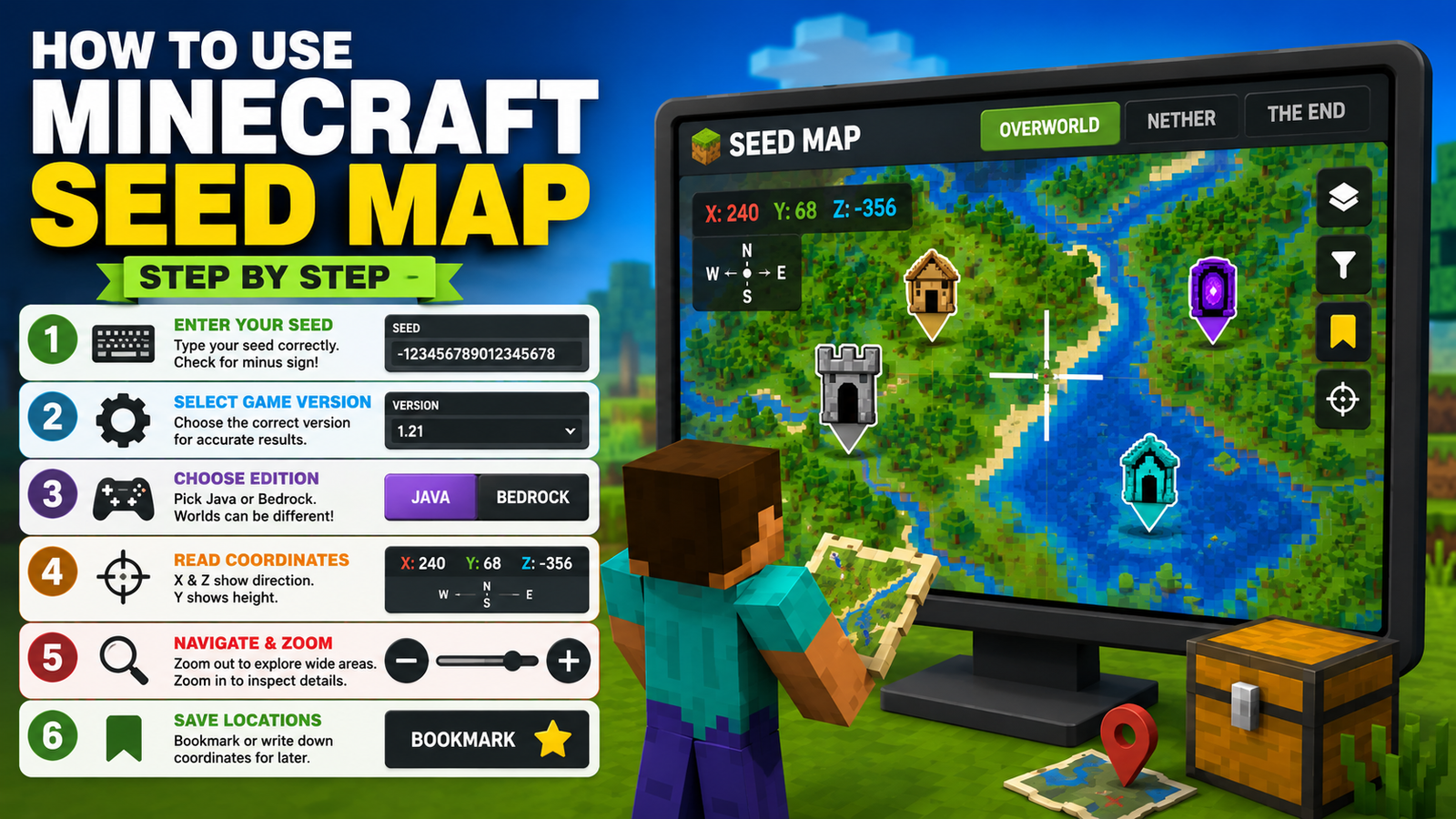
How To Use A Minecraft Seed Map Step By Step?
Once you have a seed in hand, using a seed map takes less time than loading the world itself. Enter your seed correctly. Watch closely for a minus sign, since a missing one points you toward a totally different world. Select the correct game version, since Minecraft has changed its generation rules many times across updates.
Choose Java or Bedrock because the two editions can generate noticeably different terrain from the same seed. Read the coordinates on screen.
X and Z show distance east, west, north, or south from spawn, while Y shows height. Navigate and zoom with your mouse or fingers to scan wide areas, then zoom in once something promising appears. Save locations for later. Write down coordinates or use the tool’s bookmark feature, so you never hunt for the same spot twice.
Minecraft Biome Finder Explained
What Is A Biome Finder?
A biome finder is a smaller, more focused cousin of the full seed map. Instead of every structure, it highlights only the biomes spread across your world. Each biome is color-coded, so a desert next to a swamp jumps out instantly.
How Do Biome Finders Work?
These tools read the same generation data as a full seed viewer, but they strip away extra layers. That makes them load faster for players who only care about plant life and ground type.
Finding Rare Biomes Quickly
Some biomes barely show up at all, including Mushroom Fields, Cherry Grove, Badlands, Mangrove Swamp, Ice Spikes, and Deep Dark. A biome finder searches your seed for these rare patches and drops a marker right on top of them.
Best Uses For A Minecraft Biome Finder
Builders lean on biome finders to scout a backdrop for a project. Survival players use them for resource runs, since certain ores and plants only spawn in specific biomes. Challenge runners often plan an entire playthrough around one single biome type.
Structure Finder Minecraft Guide
A structure finder narrows a full seed map down to one job, pointing you straight at a single building type. Type in village finder, stronghold finder, bastion finder, or trial chambers Minecraft finder. The structure locator then searches your seed for the nearest match.
| Structure | Found In | Why Players Search For It |
|---|---|---|
| Village | Overworld | Free trading, beds, and food early on |
| Stronghold | Underground | Required to reach the End Portal |
| Bastion Remnant | Nether | Gold blocks and rare Netherite gear |
| Trial Chambers | Underground | Vault rewards and combat challenges |
| Ancient City | Deep Dark | Echo shards, sculk, and the Warden |
| Woodland Mansion | Dark Forest | Totems of Undying and big loot rooms |
| Ocean Monument | Ocean | Sponges, prismarine, and guardian fights |
| Desert Temple | Desert | A hidden treasure room with a trap |
| Jungle Temple | Jungle | Puzzle traps and rare loot chests |
| Pillager Outpost | Overworld | Crossbows, banners, and raid triggers |
| Nether Fortress | Nether | Blaze rods and wither skeleton skulls |
Villages give new players a safe place to trade and sleep without building from scratch. Strongholds matter because the End Portal only generates inside one. Finding it is the only path to the Ender Dragon. Bastions reward Nether trips with netherite gear. Trial Chambers hand out vault loot to anyone willing to fight through trial spawners.
Minecraft Seed Map For Bedrock Edition
Does Bedrock Support Seed Maps?
Yes. Most established seed map tools added Bedrock support years ago. You must select Bedrock specifically from a dropdown menu, though, or the tool defaults to Java rules.
Bedrock Versus Java Seed Generation Differences
Bedrock and Java run on separate code bases built by different teams. So the same seed number can produce noticeably different terrain between the two. A village sitting at one set of coordinates in Java may shift several blocks away on Bedrock.
Common Bedrock Limitations
Older Bedrock worlds, especially ones carried over from console editions, sometimes lack a visible seed entirely. Infinite worlds also behave a little differently near the world border compared to Java.
Tips For Accurate Bedrock Results
Confirm you picked Bedrock Edition on the map tool, and double-check your game version in settings. Remember that Realms created on different platforms can occasionally generate with small variations.
Minecraft Seed Finder For Java Edition
Java Specific Features
Java Edition seed finders often include extra detail; Bedrock tools skip it, such as slime chunk overlays and exact mob spawn coordinates. The Java community has spent years studying the generation code closely.
Why Do Java Players Often Get More Accurate Results?
Because Java was Minecraft’s original platform, most third-party tools were built and tested against it first. Java seed data tends to stay current the moment a new update ships.
Version Specific Considerations
Generation shifted heavily across several updates. Version 1.18 reworked the cave and mountain height. Version 1.19 added the Deep Dark and Ancient City. Version 1.20 brought cherry groves and archaeology. Version 1.21 and later introduced Trial Chambers. Always match your seed map to your exact version, or the structures shown may not exist in your save.
Minecraft Seed Viewer Features You Should Know
Modern seed viewers pack in more than a flat picture of the land. Interactive coordinate tracking lets you hover anywhere and instantly see the X, Y, and Z numbers for that spot. Layer filters switch biome colors, structure icons, and grid lines on and off, so the screen never turns cluttered. A colored biome overlay also makes a desert beside a forest stand out, even from a wide zoomed view.
Structure toggles let you pick exactly which buildings appear. Separate Nether and Overworld tabs help you plan a Nether highway that lines up with your base above ground. Many tools also let you export a shareable link with your exact view saved. This is handy for sending a friend straight to a discovery.
Benefits Of Using A Minecraft World Seed Map
Walking blindly across a world to find one structure can eat an entire evening. A seed map turns that same search into a two-minute lookup. Builders working on huge projects need flat land or ocean access, and scouting ahead avoids costly redo work later. Knowing where the nearest village or stronghold sits lets new players gear up faster. They can reach the End Portal without weeks of slow walking.
Rare biomes and structures can sit thousands of blocks from spawn, and a seed map cuts that hunt down dramatically. Server owners and friend groups also use seed maps to divide territory fairly before anyone starts building. This avoids two players claiming the same hill.
Are Minecraft Seed Maps Safe To Use?
Do Seed Maps Affect Gameplay?
No. A seed map only reads information that already exists inside your world’s code. It does not change terrain, add items, or touch your save file in any way.
Are Seed Finders Considered Cheating?
This comes down to personal taste and server rules. Official speedrun leaderboards ban outside lookups mid-run. A casual single-player world carries no such restriction, since Minecraft has no built-in penalty for using outside tools.
Privacy And Security Considerations
Stick to well-established seed map sites, and avoid entering any personal account details. A proper tool only ever needs a seed number and a version.
Choosing Reliable Seed Tools
Look for tools that clearly state which version they support. The best ones get updated soon after major releases, the way trusted community sites such as Chunkbase have done for years.
Common Problems And Troubleshooting
Mismatched results almost always trace back to a version mismatch or a typo in the seed itself. A missing minus sign on negative seeds is a common culprit. A map set to the wrong version will not reflect a newer world, even when the seed number stays identical. Mixing up Java and Bedrock causes the same kind of confusion. Missing structure coordinates usually mean the structure did not exist yet in the version you selected. An Ancient City, for example, cannot appear on a map set to a release before it was added.
When Mojang ships an update, chunks already generated stay frozen in the old style. New chunks generate under fresh rules instead, creating a visible seam that no seed map can predict. If a long negative seed keeps failing to load, retype it manually instead of copying it. Stray characters slip in more often than you would expect.
Tips To Get The Most Accurate Seed Results
Always verify your exact game version before searching, since even a small patch can shift generation. Double-check every digit of your seed, especially the minus sign. One wrong character lands you in a different world entirely. Understand which terrain updates landed between your version and today. That way, you know whether a feature should even exist in your save.
Here is something most guides skip: cross-check a rare structure on two seed map tools before trusting it. Small rounding differences between sites can shift a stronghold by a few chunks. Write promising spots down the moment you find them. Mark important discoveries inside the game itself with a map item or a written book.
Minecraft Seed Map Use Cases
Top speedrunners study seed data obsessively during practice, memorizing structure layouts to shave seconds off an official run. Hardcore survival players have only one life on the line. They scout dangerous areas like Ancient Cities ahead of time rather than walking in blind. City builders need flat plains or long coastline, and a seed map finds that terrain before a single tree gets chopped.
Friend groups starting a new Realm often scout the map together first. They split biomes and resource zones so nobody steps on anyone else’s project. Many creators plan entire video series around one seed packed with rare structures. Classroom Minecraft programs use seed maps too, setting up terrain that matches the day’s lesson.
Best Practices Before Exploring Seed Maps
Imagine loading into a brand new world for the very first time. Your heart races as you wonder what waits past the trees. Checking a seed map before that first walk can quietly steal some of that wonder. First-time players might enjoy holding off until after the initial exploration.
Some players want full discovery with zero spoilers, while others want maximum efficiency. Neither approach is wrong, as long as you decide ahead of time which one fits you. A middle ground works well for most people. Check a seed map only when stuck or short on time, but leave room for the occasional happy accident found on foot.
Frequently Asked Questions
What Is A Minecraft Seed Map?
A Minecraft seed map is a tool that reads your world’s seed number and version. It then draws a preview of the biomes and structures generated across that world.
How Do I Find My Minecraft Seed?
Java players type /seed in chat. Bedrock players check World Settings instead, where the seed number sits near the top of the menu.
Are Minecraft Seed Maps Accurate?
Yes, as long as you select the matching game version and edition. The generation math behind the map tool is identical to the math behind the actual game.
Can I Use A Seed Finder For Bedrock Edition?
Yes, most established seed finders support Bedrock directly. You just need to select Bedrock from the tool’s settings rather than leaving it on the Java default.
How Do I Locate A Stronghold Using A Seed Map?
Enter your seed and version, then switch to stronghold finder mode if the tool offers one. The map marks the nearest stronghold along with its coordinates.
Is Using A Minecraft Structure Finder Considered Cheating?
Only on official speedrun leaderboards that ban outside tools mid-run. Casual and single-player worlds carry no built-in restriction, so the choice comes down to personal preference.
Final Takeaway
A Minecraft seed map turns hours of blind wandering into minutes of smart planning. That holds true whether you are hunting a stronghold, scouting cherry groves, or laying out a Realm with friends. Java and Bedrock players both have strong tools available. Picking the correct edition and version before searching, though, makes the difference between an accurate map and a confusing one.
Structure finders, biome finders, and full seed viewers each serve a slightly different job. Knowing which one to reach for saves real time at the keyboard. The next time you load a fresh world, pull up a Minecraft seed map first and confirm your version. Then let the data point you straight toward the villages, strongholds, and rare biomes waiting just past spawn.